FAQ: Academic
Yes, we can certainly apply your target journal's style guidelines to your article. Please provide us with the name of the target journal when you place your order. If possible, please provide a link to the specific style guidelines: simply copy the URL for the journal’s guidelines and paste it into the "Instructions" section when you place your order.
Your editor can ensure the consistent formatting of formulas and can revise the language that introduces such formulas and calculations to ensure that the work is presented clearly, but reviewing the correctness of the actual formulas is beyond the scope of the service. If there is any uncertainty about your calculations, they should be checked by top experts and peers in your chosen field. At this point, our language experts can then revise your writing to ensure clarity and precision of expression throughout to ensure that your results are properly communicated and can be published to contribute to the important literature in your field.
Scribendi can provide the professional editing needed to improve your work and get it ready for publication. Our expert editors will eliminate typos, ensure grammatical correctness, and smooth out the writing so that it is clear and expressive. We will make the required revisions to ensure consistency throughout the document, and we can apply a style guide of your choice, including specific journal guidelines, to format your citations and references. Our editors will also provide critical commentary, pointing out where potential issues remain, where arguments may be flawed or incomplete, and where further improvements are possible.
You’ve done the hard work, and you don’t want your work to be rejected because it lacks a final polish. Have Scribendi shine up your work for submission.
If you’ve had an order completed by Scribendi, the Scribendi invoice can be used as proof of editing, as it has been designed to provide the necessary information for proof of editing. However, if you require something more specific, we can provide you with a certificate indicating that your work has been edited by Scribendi. Just contact us and let us know what you require; one of our Customer Relationship Specialists will be happy to help you.
No problem. When you place your order, just tell us what style guide we should apply to your work; our editor will ensure that the style guidelines are applied consistently throughout your document. You can indicate whether you want your style guide applied to the citations and references, the page and text elements, or both. Visit our Academic and Student pages to see all of our available services.
Yes! We can hold funds in your account for future orders. Please start by registering your account here: https://www.scribendi.com/register. Once that is done, we will have to set up your account; please contact our Customer Support department at customerservice@scribendi.com to get started.
Once the account is set up, you will be able to generate a pro forma invoice if needed. Once the funds have arrived, you will be able to use them to pay for your order through our online checkout.
Scribendi is happy to edit and proofread academic work in which generative AI has been used, and we recognize that generative AI is an increasingly common part of research and writing. Because academic integrity is essential, we ask only that generative AI be used responsibly in the work you submit. You remain academically and legally responsible for work produced with AI’s help, including any intellectual-property or copyright issues.
Your institution, publisher, or target journal will have its own policy on how generative AI can be used and how it must be disclosed, and their requirements take priority and should be followed carefully.
It may be that you have the "Show Markup" feature turned off. If you are using Microsoft Word 2010 or later, click on the Review tab. In the section named "Tracking," there are three drop-down menus—they're to the right of the button named "Tracked Changes." Click on the top one. Choose All Markup.
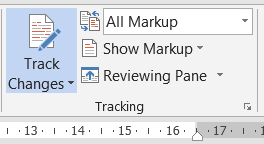
Then, click the Show Markup menu and then make sure that all the markup options are checked, including "Insertions and Deletions."
If you are using Word 2007/Office XP, click on the tab named Review. In the section named "Tracking," there are three drop-down menus—they're to the right of the button named "Balloons." Click on the top one. Choose Final Showing Markup.
If you still don't see any changes, please feel free to contact us or get in touch via chat.
We can apply any style guide to your work. The most popular style guides are the American Psychological Association (APA), Modern Language Association (MLA), Turabian, Chicago Manual of Style, Harvard Referencing, and Council of Science Editors (CSE). We can also apply a journal’s style guide (just send us a link to the guide or tell us the name of the journal) or a corporate/internal style guide. If you have your own unique style guide that you need applied to your document, you can upload the style guide to the order as a reference for your editor.
Yes—and always with a human editor in control. Scribendi uses the following two kinds of AI, both of which are used as tools that support our editors rather than replacing them:
- Scribendi AI—our own proprietary tool. This is a predictive (not generative) tool that uses machine learning to help editors quickly identify potential grammar, punctuation, spelling, and consistency issues. It cannot make changes to a document on its own and never operates without a human editor.
- Third-party AI tools, including generative AI, which we use under commercial (business) agreements to support tasks such as quality checking and internal workflows. Under those agreements, the content you submit is not used to train or improve the AI provider’s models.
Regardless of which tools are involved, our guarantee is the same: every document submitted for editing or proofreading is fully reviewed and edited by a professional human editor. AI tools may help our editors work more quickly, accurately, and consistently, but it is always the editor who reviews your text, exercises editorial judgment, and decides on the revisions and comments in your document.
For MS Word files (.doc and .docx), we use the Track Changes and the Comments features. You can access the Track Changes and Comments tools by clicking on the Review tab.
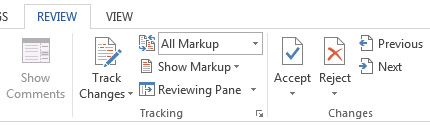
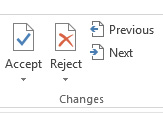
You can use the tools on the Review tab to Accept or Reject changes one by one, or you can Accept or Reject the changes all at once.
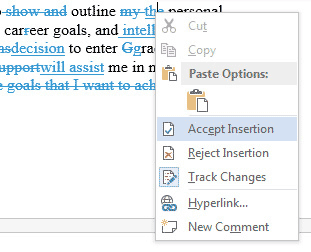
You can also right-click on individual changes in the document to access the Accept/Reject functions.
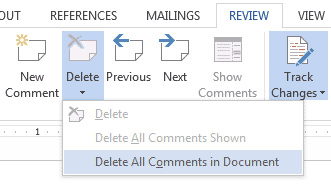
You can also delete the comments with the Review tab.
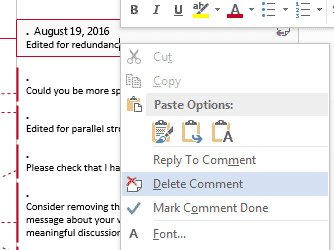
Right-clicking on a comment balloon also brings up a Delete Comment function in the fly-out menu.
In MS Word, go to the Review tab or Tools menu and select Word Count. If you're doing a word count for an academic paper, be sure to check the option to include footnotes and endnotes in the word count. You can also use the Scribendi Word Count Tool. Simply copy and paste your text into the Word Count Tool, and it will provide the word count of the document.
Please note: We do try to double-check word counts on the documents that we receive, but to ensure that there are no delays in processing your order, please make every effort to give us an accurate count. If there is a section that you do not want us to check, please mention this in the "Instructions" field of the order form.
More than 99.5% of our orders are delivered before the chosen deadline. However, rare unforeseen issues with a document can cause slight delays. If your order is late, please contact us.
Scribendi takes customer satisfaction very seriously. You can provide feedback directly to us (there will be a link on your order details page), or you can get in touch with us using the Scribendi Contact Us page or by calling us at +1 (519) 351-1626, and we will look into your issue immediately.


